Art-Net Overview
Art-Net is an Ethernet-based protocol for controlling professional lighting fixtures, allowing DMX universes to be transmitted over a single network cable. With the Version 1.5 release, using the Ethernet port on the MaestroDMX unit, MaestroDMX can now send data to an additional universe. This means that fixtures with more complex DMX setups—whether they use higher channel counts or larger quantities of fixtures —can be fully controlled by a single MaestroDMX.
There are many ways to translate Ethernet to DMX but most need some sort of DMX converter like this one-
PK night BiDirectional Art-Net to DMX converter
Adding An Art-net Universe
In the Stage tab there is the option to add an output to the stage using Art-Net. Using the 3-dot Menu next to the Internal DMX dropdown, select ‘Add Output'.
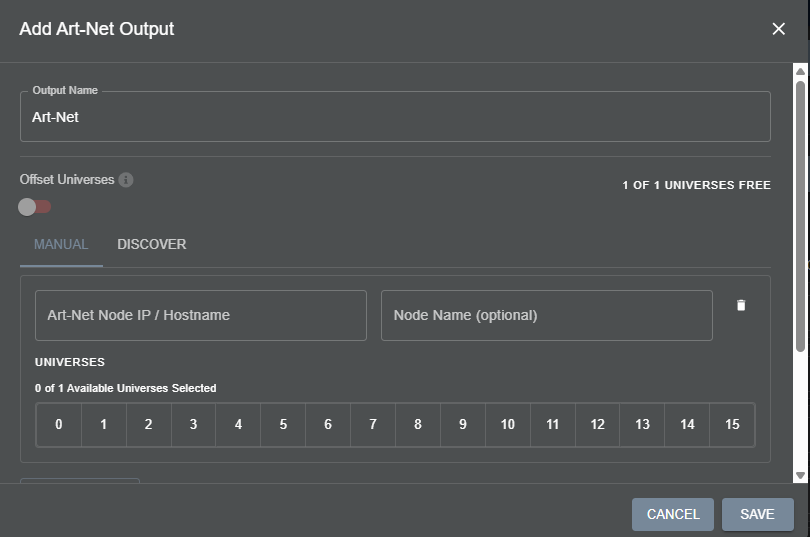
Users can define the Art-Net universe manually-
Name the universe
Define its IP address
Name and add Nodes
Decide which Universe of DMX
Enable or Disable Art-Net output
Offset Universes - This toggle allows the first universe to be defined as either Universe 0 or Universe 1. Different software and Art-Net interfaces can vary on what the first universe will be; use this toggle to help MaestroDMX line up with users' needs.
Use the ‘Add Node’ to send the Art-Net data to multiple devices with different IP addresses.
Users can also easily find and connect to Art-Net Nodes using Discover
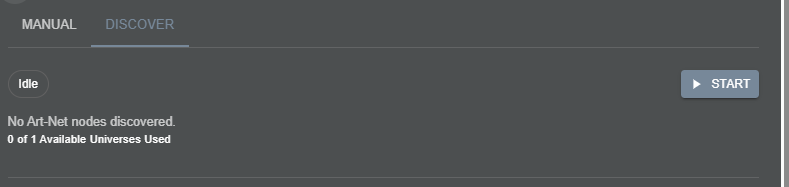
Hit the start button, and MaestroDMX will scan for available nodes. This generally takes about 20 seconds and will populate the window with any found information.
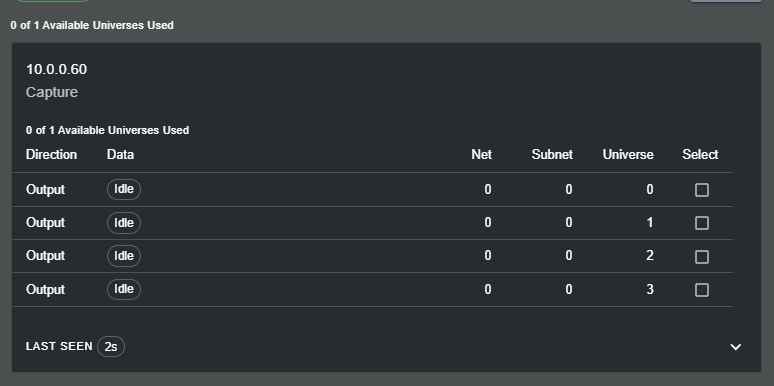
The IP Address and Name of the discovered nodes will be shown. Users have the option to select which universe of DMX data is sent.
Once a node is selected, it can be edited to change the IP address or name of the universe and add more nodes to the selected universe using the manual tab.
Unpatched Fixtures and Moving Fixtures Between Universes
Once the Art-Net Universe is made, users can add fixtures to the Art-Net Universe and move fixtures from the existing DMX stage over to the Art-Net stage.
By hitting the 3-dot menu next to any fixture, you will see a list of options to affect that specific fixture.
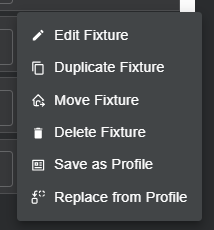
Using the ‘Move Fixture’ option will allow the fixture to be placed on either the DMX universe or Art-Net universe stages and can be re-addressed to fit onto the different stages.
When an Art-Net universe is deleted, users will have the option to either delete the fixtures on that universe from the stage or move them to the unpatched universe. Keeping the fixtures in the unpatched universe is especially handy if the fixtures have Snapshots or FX Palettes associated with them. From the Unpatched universe, users can move the fixtures to their DMX output or keep them unpatched and unused in the meantime.
Was this article helpful?
That’s Great!
Thank you for your feedback
Sorry! We couldn't be helpful
Thank you for your feedback
Feedback sent
We appreciate your effort and will try to fix the article